Key Takeaways
- The Portfolio Manager helps traders organize and track seasonal trading opportunities.
- Users can save custom waves directly from the Wave Viewer.
- Built-in reporting, calendar integration, and performance tracking simplify portfolio management.
- Portfolio-level P&L monitoring provides a centralized performance overview.
What Is the Portfolio Manager?
The Portfolio Manager is TradeWave’s centralized workspace for saving, organizing, tracking, and analyzing trading opportunities.
It allows traders to monitor seasonal trades, review performance metrics, generate reports, and manage multiple custom portfolios from one interface.
Whether you are tracking a handful of opportunities or managing a broader seasonal strategy, the Portfolio Manager helps streamline the process.
How to Add Opportunities to Your Portfolio
Select an Opportunity
Browse the Opportunities Table and load an opportunity into the Wave Viewer.
Save the Opportunity
Click the “+” icon on the upper-left side of the Wave Viewer to add the opportunity to your portfolio.
Save Custom Date Ranges
TradeWave also allows traders to customize date ranges directly within the Wave Viewer before saving them.
This means you are not limited to algorithmically surfaced opportunities - you can build fully customized seasonal strategies.
How to Access the Portfolio Manager
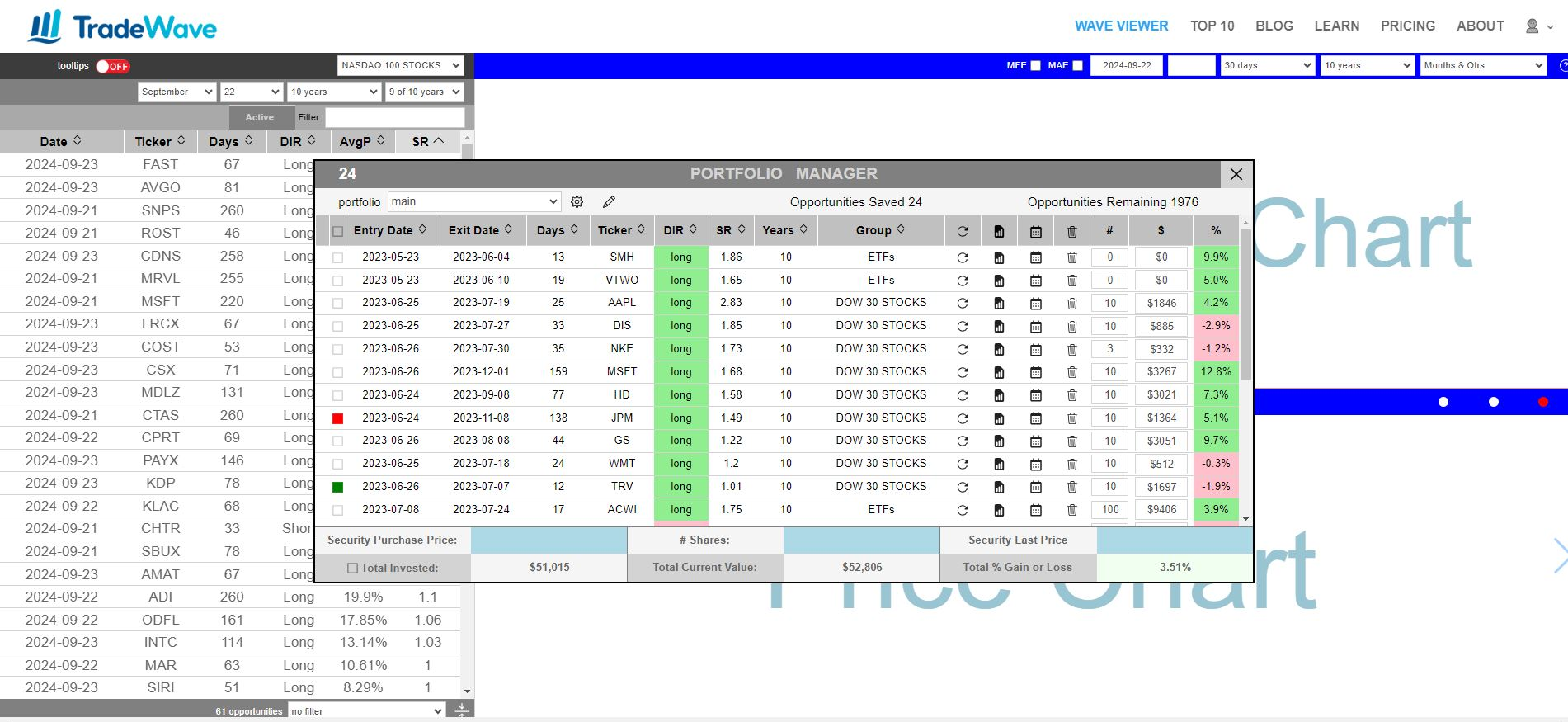
Click the portfolio icon on the left side of the center horizontal ribbon to open the Portfolio Manager interface.
Portfolio Manager Features
Portfolio Selection and Management
Use the dropdown menu to switch between portfolios.
The settings button allows you to create new portfolios or remove existing ones.
Portfolio Notes
Use the pencil icon to add notes, descriptions, or strategy comments to each portfolio.
Saved Opportunities
Each row represents a saved seasonal opportunity and includes: - Entry and exit dates - Ticker symbol - Direction - Performance metrics
Portfolio Action Icons Explained
Recall
Reloads the saved opportunity into the Wave Viewer for further analysis.
Custom Report
Generates a detailed, shareable report for the selected opportunity.
Reports can be shared through email or social media.
Notifications
Integrates with Google Calendar to create reminders for trade entry and exit dates.
Delete
Removes the opportunity from the portfolio.
Shares, Investment Amounts, and P&L Tracking
The Portfolio Manager also allows users to: - Enter share quantities - Track investment amounts - Monitor profit and loss (P&L) for each opportunity
The bottom rows display: - Detailed information for the highlighted opportunity - Total portfolio-wide P&L performance
Why the Portfolio Manager Matters
Successful trading requires organization, discipline, and ongoing performance review.
The Portfolio Manager gives traders a centralized system for tracking opportunities, evaluating results, and refining seasonal trading strategies over time.